.svg)
Keypad Settings
Up to two CAN Keypads can be used on a Razor PDM. The list of supported models are detailed below.
Keypad Settings Configuration
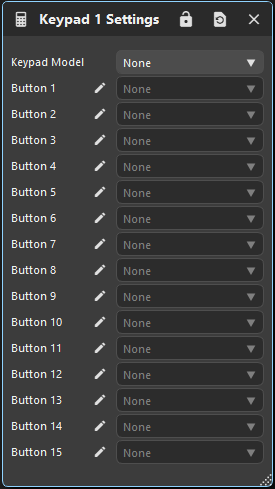
|
Keypad Model |
The model of the CAN Keypad. Changing the model will allow different numbers of buttons to be used e.g. a 5 button keypad will let you choose the function on buttons 1 - 5 |
|
Button |
Choose which Keypad Function is used to control each button on the keypad. |
Keypad Function
A Keypad Function determines how a button on the CAN keypad behaves.
There are 16 functions in total which can be used entirely on one keypad, or shared across two. Each function can have its label changed to describe its use.
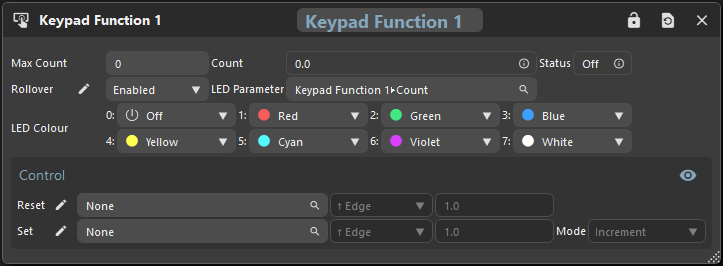
Keypad Function Configuration
|
Max Count |
This button counts up once per press and rolls over to 0 at Max Count.
|
|
Count |
Count holds the number of presses |
|
Status |
Status is Active only when the button is pressed. |
|
Rollover |
Select if the count should rollover once reaching ‘Max Count’ while incrementing or 0 while decrementing |
|
LED Parameter |
Parameter that determines which LED state to use for visual feedback. |
|
LED Colour |
Sets the button colour/state that is shown when the LED Parameter is equal to a number from 0 to 7. |
|
Reset Expression |
Select a parameter, operator and value that, when evaluated as true, reset the Keypad Function Count ⭐Rising and Falling Edge operators evaluate as true when the expression parameter goes from less than the set value to equal or more. |
|
Set Expression |
Select a parameter, operator and value that, when evaluated as true, increment or decrement the Keypad Function Count. Allows two buttons to increment/decrement a single count. |
|
Set Mode |
Determines whether the Set Expression increments or decrements the count. |