.svg)
Timers are used to generate low-speed output pulses or generate timing count values which may be used by GP Logic, GP Function or Math blocks to perform complex timed functions.
Timer Configuration
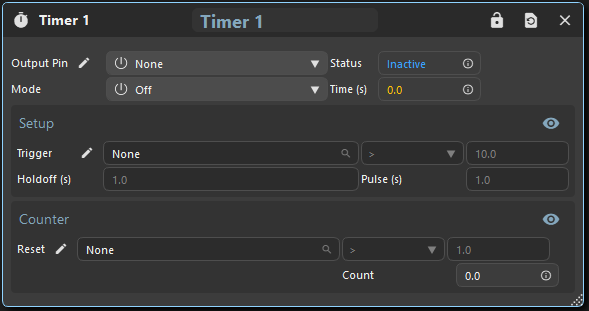
|
Output Pin |
Choose which pin to control. If not set, the timer may be used via its Status output. |
|
Status |
Timer status:
|
|
Mode |
Sets the timer mode:
|
|
Time |
Time in seconds since trigger. Rolls over to 0 every Holdoff + Pulse timing period. |
|
Trigger |
When the logical expression (Parameter, Operator, Value) results in an Active status result, the timer is triggered. ⭐Edge operators function upon a parameter change. |
|
Holdoff |
Time to wait before going to the Triggered/Active state. |
|
Pulse |
Time to wait before going to the Inactive state after a successful trigger. |
|
Count |
The count of pulses generated by the timer. |
|
Counter Reset |
Select a parameter, operator and value that, when evaluated as true, reset the Timer Count |