.svg)
Line pressure tuning
Overview
A good line pressure tune can be the difference between a tune you or your customer love or resent. The importance of nice smooth shifts at low TPS values should not be understated, even on tunes that are aimed towards motorsports of offroading.
The Tables for line pressure are fully configurable, so you can use various runtimes to represent engine load, vs desired shift point.
Keep in mind duty % is normally inverse to line pressure in most transmissions, if you are unsure with yours, refer to PC Link help.
In general:
-
Lower line pressures (higher %dc) typically result in softer shifts
-
High line pressures (lower %dc) results in faster, firmer shifts
Practical Tuning
If you are unsure of what line pressure you should run, err of the side of more line pressure for a given cell, then tune down to a point the shift feels good or as desired.
A good shift isn’t unnecessarily firm when it doesn’t need to be, and fast, without flairing when it needs to be.
Tune line pressures initially with the transmission fully up to temp, and the temp offset table zeroed.
Go back for tweaks and setting up the Line Pressure Temperature Offset Table when cold, after the initial line pressure tune is done.
To tune a given cell in your table, repeat multiple shifts in that cell, changing the line pressure each time till you get smooth shift. Doing this tuning on the 2-3 shift can net good results for most shifts.
Tuning cells at high RPM/low load will be possible by letting off throttle once you reach the high RPM to trigger the shift.
It’s important to tune these high RPM low load cells for general driveability/comfort on road, if you get the line pressure too high in these cells, it results in a harsh shifting as you let off the throttle after accelerating. If tuning a road car, or for a customer, these hard shifts will be noticed.
For the rough tune, a good rule of thumb is:
-
Shifts at low load or under 50kpa MAP should be tuned for smoothness.
-
Shifts around half throttle/half load should be tuned for shift speed without being too firm.
-
Shifts tuned over half throttle/higher loads should be tuned with transmission longevity (by not allowing too much slip) and shift speed in mind.
Note for vehicles making more toque than factory, you will likely want higher line pressures in the mid range, and will probably want maximum line pressures earlier than you would with a stock engine.
Keep line pressure high for high load shifts as to not slip your clutch packs or bands. These high load shifts you may see the RPM’s slew slowly down as the torque fights against the shift, increase line pressure to minimise this slew down time. If you have long slew downs even when commanding maximum line pressure, it’s a good idea to set up your Shifting Max Torque table, or UpShift Cut Table
1-2 Shifts
1-2 shifts can be quite difficult to tune. In testing with the Subaru 4EAT, the line pressure requirements for the 1-2 shift greatly differed from the 2-3 and 3-4 shifts for example. It was found that smoother shifts happened with higher line pressures for the 1-2 shift, rather than lower line pressures, inverse of how the 2-3 and 3-4 shifts needed to be tuned
In the test car, the customisability of the axis' was leveraged to have a multi zone 3D table to have different line pressures commanded for the 1-2 shift vs the 2-3 and 3-4 shifts.
Line Pressure DC% and Line Pressure Shifting DC%
During setup you can mirror these two tables. But once you have your line pressures dialed, you can leverage the differences in these tables. Shifting DC% is used during a shift, the shift being defined by the Shift Time table, starting from the point at which the shift is commanded, or after the delay set in the Shift Torque Delay table, and ending when the time in the Shift Time table ends.
Examples of how you can use this may be maintaining higher line pressure in gear for high torque applications. Some older transmissions may not be able to make effective use of these two tables, as the line pressure can take some time to propagate through the valve body, leading to the drop in line pressure being effective after the shift has occured.
Shift Times
Now that your Line Pressure tables are tuned to your liking, you can return back to your shift times to dial in what your max times will be in practice.
Drive the car as you would normally, from cold up to operating temp, with the intent to try capture shifting in all gears at different temperatures.
It’s important to set the shift times based on the longest shifts observed in each gear, as both Shifting Max Torque, or UpShift Cut will cancel once the end of the shift timer is complete
If you are relying on Shifting Max Torque, or UpShift Cut to help with high torque applications, setting the timer too short and letting it time out before a shift is physically complete can result in excessively slipped clutches/bands, or transmission flairing.
The ECU will not command the next shift until the timer is complete, so if you set the timer too long, it can make the transmission feel sluggish or lazy.
Shifting Max Torque, and UpShift Cut
Shifting Max Torque
Shifting Max Torque leverages the Torque Management system in the ECU and can be used to protect the transmission from higher toque engines during a shift. For this function to work the Torque Management function must be setup and tuned correctly.
Shifting Max Torque can be considered a safety setting to protect the transmission, rather than a tool to help speed up shifting.
Without setting up the Shifting Toque Delay table, the torque limit will be applied from the moment the shift is commanded, untill the Shift Time timer ends. On older transmissions this can feel quite strange as the torque reduction kicks in, but you still have to wait for a second before the shift physically occurs.
You can tune the Shifting Toque Delay table in the same way as you tune the Shift Time table, but instead looking for the shortest time between the shift being commanded, and the shift physically starting.
UpShift Cut
UpShift Cut is a tool for helping you speed up your physical shift times. It monitors your TC Slip while the transmission status is “shifting” to know when a shift has physically started.
This setting should only be used once line pressure has been tuned, as it relies on the slew down of your RPM during the shift. If you have line pressures too low and experience flairing, it will not function, and will not save the transmission from flairing.
Read the PCLink Help file for instruction on how to set the slip %'s in this setting.
If you set the Start % too high, you can get false positives and the cut will be triggered early before the shift actually starts to occur. If you set it too low, you will miss the start of the physical shift and the cut will be applied late.
If you set the End % too low, it will not cancel the cut until the Shift Time timer finishes. If you set End % too high, it will cancel the cut too soon before the shift is physically complete, and can result in an RPM flair after the cut cancels.
Setting this up can only be done through trial and error, and often the final settings are a compromise between good functionality and reducing false positives.
Tuning Torque Converter Lockup
You should have set up TC lockup during your initial setup, but now we can dial it in.
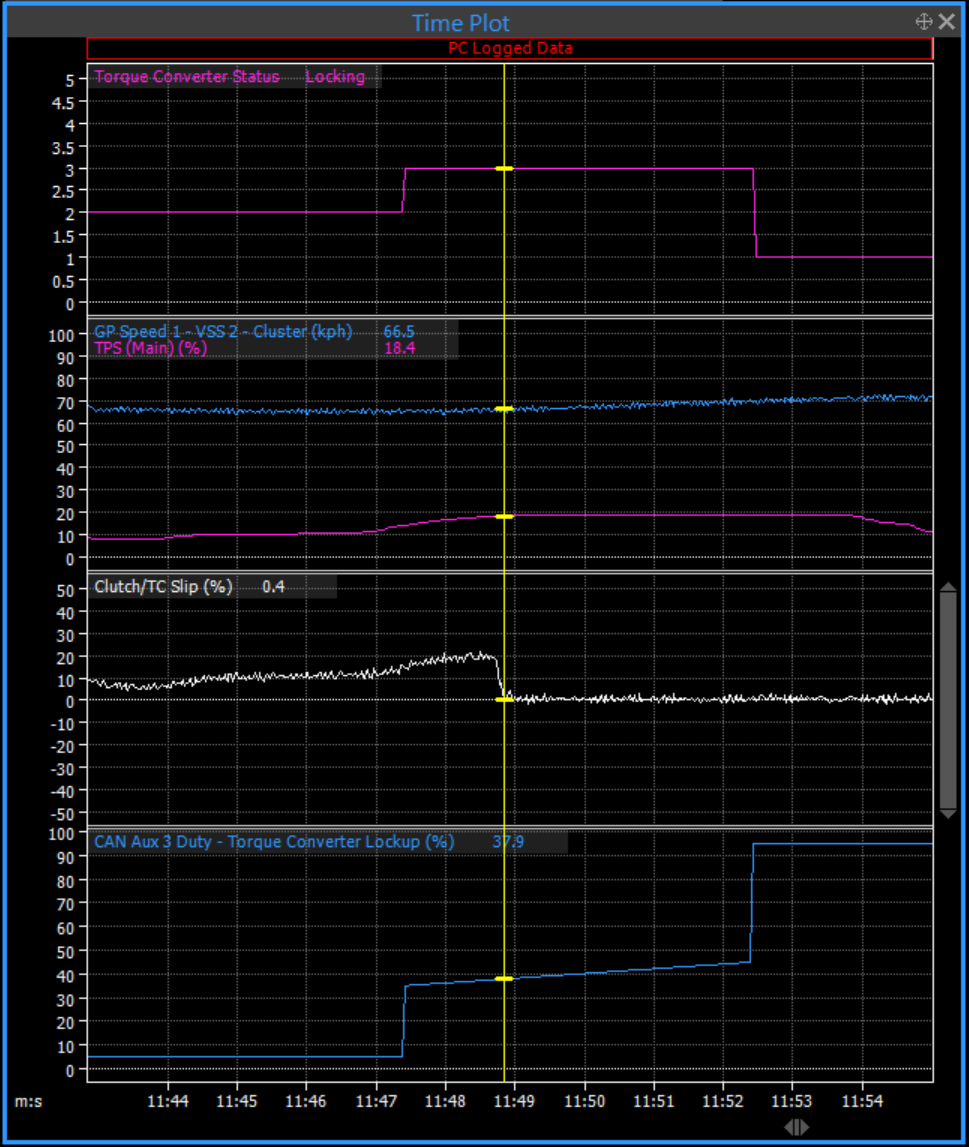
You want to log at least Clutch/TC Slip (%) and Torque Converter Lockup (%), and take a look at the % your torque converter locks up at. Try and log various conditions such as trans temp and throttle position to catch the range of %'s at which lockup engages. You’ll see TC Slip % drop to around 0% at the point the lockup clutch engages.
With this figure or range of figures in hand, you can set up your Start Locking DC% to say 5-10% below that figure, and the Hold DC% to 5-10% above. This should speed up lockup times nicely
In the example below, the vehicle typically locks up 1-2% either side of 38%, so lockup starts at 35%, and finishes at 45%. You can then tune the Locking Ramp Duration for desired smoothness, a shorter duration will result in a faster but more sudden and firm lockup, a longer duration will feel lazy, but smooth.